Monday, April 21, 2014

Free VPN service - PD-Proxy


PD-Proxy is a free vpn service tunneling software that can secure your internet connect, most of the vpn service provided. PD-Proxy is much easier to use than other vpn. You don`t need to install because its auto play program. You don`t need to manual install tap driver because its automatic when you open pd-launcher. You can use your trial account for 1 year, and it has daily limit of 100mb. If you are not using your trial account within 30days, they might removed your account and tagged as inactive. Below are the premium rates for PD-Proxy.


1.Signup for trial account Click Here to Get Free Trial - http://www.pdproxy.com/signup.htm

2.Kindly open the confirmation message of pdproxy in your email.3.Download the latest version of pdproxy from their Website @ http://www.pdproxy.com
5.Open PD-Proxy.exe When a prompt message asking you to install a driver press Yes.
6.Put your trial account and select TCP for globe and UDP for smart then connect wait till it says that you are connected. 
7. Enjoy browsing. 
TIPS1. Make sure that you have activated your registered account.2. Make sure the program has administrative privileges when using Win7/Vista3. Make sure you have an active internet connection.4. Check the debug mode and upload your logs at the forum
ADDITIONAL INFORMATIONPd-proxy it has,4 -- Servers For Online Games PH6 -- Servers For Torrent Download43 -- Assorted Servers2 -- Servers For Trial 

Sunday, April 20, 2014

Free VPN Service Poll

Hi all, recently I've put a poll in my blog which you can choose your favorite Free VPN service that you mostly like. You can choose SecurityKISS VPN, OkayFreedom, Cyberghost VPN, HotspotShield VPN, and comment below why you choose those VPN. If your free vpn service is not included in the list, you can post a comment below and choose Other(s). So, start voting now, you can see the poll in the right side of this blog.

Monday, April 14, 2014

Free VPN service - SecurityKISS VPN

SecurityKISS is a Free VPN service that establish in Ireland. They offer 300mb/day for the bandwidth, also this Free VPN is adFree application. Unlike to other Free VPN service.  If you want to avail their paid version of SecurityKiss you can visit their website at http://www.securitykiss.com/. Most of the platform are supported by this application. Mac, Windows, Android, Linux, iOS. Free users of SecurityKISS are not able to access the Music and Video streaming website. But some of the users reported that they can actually visit those streaming websites.But since you have only 300mb/day, you will not enjoy the streaming websites. If you upgrade to their various plans you can get up to 50Gb/month.


Thursday, April 3, 2014

Free VPN - OkayFreedom

OkayFreedom is one of the competitor of CyberGhost VPN service as I recently posted in this blog. With OkayFreedom, this VPN service has no ads and you can get up to 10GB bandwith for the promotion if you do. For the regular user, you can get up to 1GB per month. One of the reason why they choose OkayFreedom is because it is affordable and easy to use(if you are not that techie guy) for only $29.95/year or $2.49/month with unlimited traffic. 


Try to visit their website at https://www.okayfreedom.com/ 

Friday, March 14, 2014

Free VPN - Cyberghost VPN

As featured in PC Magazine "If you are looking for free VPN service, CyberGhost VPN is by far the best one I've seen.". They have over 288 running and stable servers including United Kingdom, United States country and many more. You may visit their website at http://www.cyberghostvpn.com/

They have also limited offer who will buy until March 28.


CyberGhost is also running on Apple Devices such as iPhone and iPad you can download their free apps at https://itunes.apple.com/en/app/cyberghost-vpn-hotspot-schutz/id583009522?mt=8. Also, CyberGhost will launch an OS X version also for Android devices. Don't miss out and subscribe in their channel.

Thursday, March 6, 2014

Free VPN Kepard for your Android Phone!

          Kepard Application also available for Android Phones


You can download kepard via google play or click here to download manually

   How to configure kepard to your android phone


To configure the L2TP/IPSec connection:

1. Open the menu and choose Settings
2. Select Wireless and Network or Wireless Controls, depending on your version of Android
3. Select VPN Settings
4. Select Add VPN
5. Select Add L2TP/IPsec PSK VPN
6. Select VPN Name and type in a descriptive
name (Ex. Kepard L2TP )
7. Select Set VPN Server and type server hostname from list below:
lvpn2.uk.kepard.com for United Kingdom
lvpn1.uk.kepard.com for United Kingdom
lvpn3.uk.kepard.com for United Kingdom
lvpn3.us.kepard.com for USA
lvpn1.us.kepard.com for USA
lvpn2.us.kepard.com for USA
lvpn1.nl.kepard.com for Netherlands (P2P)
lvpn2.nl.kepard.com for Netherlands (P2P)
lvpn1.ca.kepard.com for Canada
lvpn1.de.kepard.com for Germany
8. You may need to use IP instead of dns name
87.117.200.126 for United Kingdom
37.220.11.18 for United Kingdom
151.236.42.9 for United Kingdom
199.115.112.140 for USA
199.195.199.164 for USA
199.167.132.160 for USA
37.220.36.4 for Netherlands (P2P)
95.211.186.223 for Netherlands (P2P)
68.71.52.213 for Canada
5.9.57.42 for Germany
9. Select Set IPSec pre-shared key and enter :
KepardIPSECPskK3y
10. Uncheck Enable L2TP secret
11. Open the menu and choose Save

To connect:

1. Open the menu and choose Settings
2. Select Wireless and Network or Wireless
Controls, depending on your version of Android
3. Select the VPN configuration from the list
4. Enter your Kepard login email and
password (use correct capitalization)
5. Select Remember username
6. Select Connect

To disconnect:

1. Open the menu and choose Settings
2. Select Wireless and Network or Wireless
Controls, depending on your version of Android
3. Select the VPN configuration from the list
4. Select Disconnect

Free VPN (KEPARD) - Unlimited and Get 180 Days for Free with Premium Access!!


Configuration Setting: Download Here!!

The more friends you will invite the longer you will use it!!
They will give you 30 days premium vpn for every 1 friend who install/use in kepard and 15 days bonus to your friend. (You can invite up to 6 friends = 180 days premium vpn!)
·         You can invite your friends using your referral link
·         Your friends will create an account and download kepard!

Take Note: Friends need to sign in kepard's application and start using premium vpn and install kepard on his/her computer otherwise you will not receive your additional premium days. Your 30 days of premium will be given from kepard


You may also try their mobile version of Free VPN Kepard for your Android Phone!.


Tuesday, March 4, 2014

Free VPN - FinchVPN

FinchVPN a new Free VPN offer their members an online anonymity server. Which is most of the Free VPN offered today. Their VPN Server located in the USA, Italy, Netherlands, France, Germany, Spain, Chile, Brazil, UK, Singapore, China. You can check their server status at http://www.finchvpn.com/status. They support OpenVPN, PPTP, L2TP connections. FinchVPN also support Windows and Android clients, also for Linux and MAC. For only $3.21 you can use unlimited monthly quota and up to 1Gbps per month.

For their pricing plan :


Disclaimer : All of the videos attached in this post are from FinchVPN, should you have concern you may visit their support  pages(http://www.finchvpn.com/support)

For the installation guide for Windows 8 :

To optimize your speed using Free VPN, you may proceed to this post on Improve internet speed using VPN connection.

Friday, February 28, 2014

Improve internet speed using VPN connection

I know most of you straggling on the connection speed of some Free VPN, because it is free do not expect that all of your Free VPN are quite fast. Today I'll show you how to improve internet speed on your VPN connection using some simple steps. I found this post when browsing the internet, credits to the owner of this tutorial. So let's the optimization begin :

Step 1 : Navigate to

Control Panel\All Control Panel Items\Network and Sharing Center

Step 2 : Click "Change Adapter Settings"
Step 3 : Find and double click the "Tap-Windows Adapter V9" to your network connection.
Step 4 : Follow the screenshots below and select only TCP/IPv4 and TCP/IPv6

And your done. Please do feedback below if this optimization improve internet speed using Free VPN

Friday, November 8, 2013

Free TroidVPN for ANDROID

TroidVPN is a new Free VPN that published last September this year. You might try it on your android devices. Just a simple step.


  1. Download it on Google Play
  2. Then install.

That's it, pretty simple huh? Don't worry, it is free. Even your android devices is rooted or not. You can use the TroidVPN. But, it has a daily limit with 1GB with a full speed. You can check their Facebook page here. Kindly drop a comment here for your feedback on using TroidVPN.

Wednesday, July 10, 2013

VPNGATE FOR PC TUTORIAL

1. Install OpenVPN Client (only once at the first time)

Download and install the OpenVPN software. It is developed by OpenVPN Technologies, Inc. and distributed as an open-source.

CLICK HERE TO DOWNLOAD OPENVPN

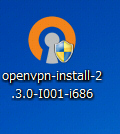
Double-click the downloaded OpenVPN program file.


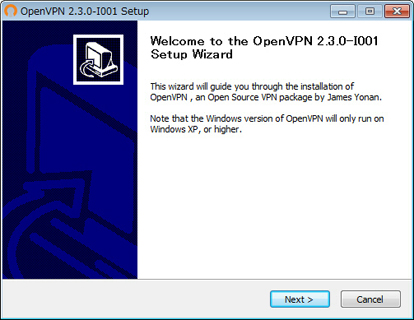
Setup wizard appears. Proceed to install along the instructions on the wizard.


2. Download and install a connection setting file (.ovpn file) of OpenVPN (only once at the first time)

You have to download an OpenVPN connection setting file (.ovpn) in order to connect to a VPN Gate Public VPN Relay Server by using OpenVPN. OpenVPN connection setting files are downloadable on the Public VPN Relay Servers List page.
Select a VPN server which you want to connect to, and click the ".ovpn" file to download to the desktop.
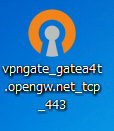
If you save the .ovpn file on the desktop, the file will be displayed as OpenVPN icon as the following figure. However, you cannot double-click this file to initiate a VPN connection.


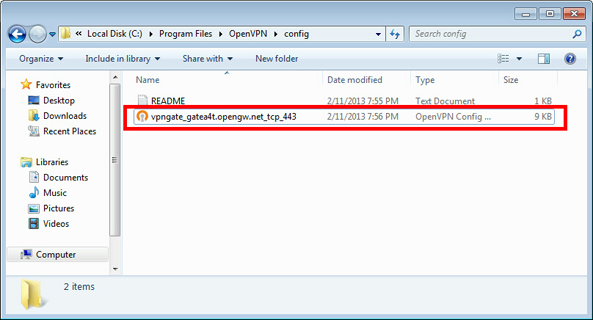
You have to put the downloaded .ovpn file into the "config" folder of OpenVPN.
Open the C:\Program Files\OpenVPN\config folder, and copy the .ovpn file into this folder.


3. Connect a VPN

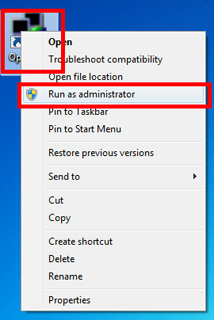
Right-click the "OpenVPN GUI" icon on the desktop, and click "Run as administrator" .
After Windows Vista, you need to use "Run as administrator" . Otherwise, VPN connection will fail.


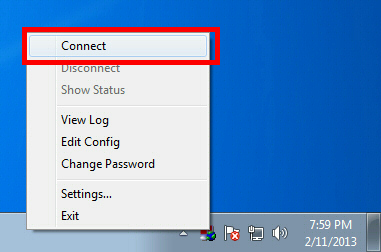
OpenVPN GUI icon will be appeared on the task-tray of Windows at the bottom-right of the screen.
(Icon sometimes hides. Click the up arrow icon to show all hidden icons.)
Right-click the OpenVPN GUI icon, and click Connect.


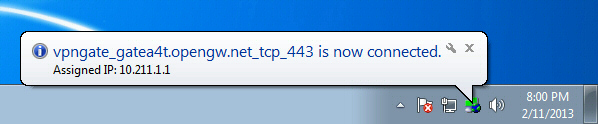
If the VPN connection is successfully established, the message appears as following.


VPNGATE TUTORIAL FOR IPHONE/IPAD

1. Install OpenVPN Connect (only once for the first time)

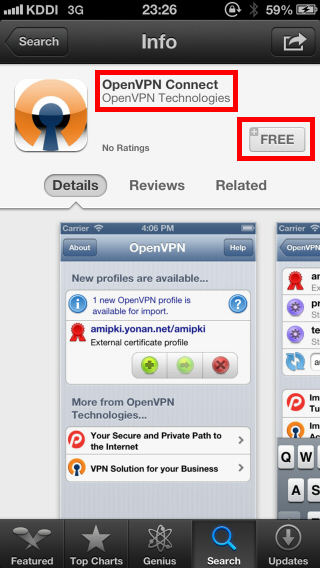
Start "App Store" , search and download the "OpenVPN Connect".


2. Download and install a connection setting file (.ovpn file) of OpenVPN (only once at the first time)

You have to download an OpenVPN connection setting file (.ovpn) in order to connect to a VPN Gate Public VPN Relay Server by using OpenVPN.
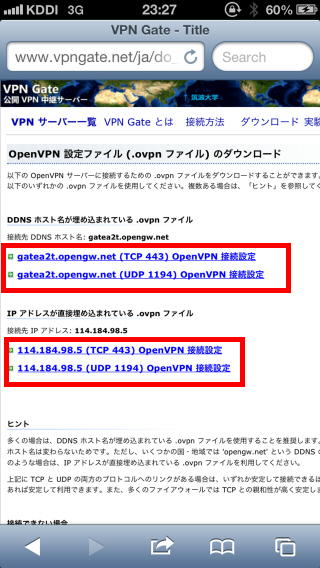
After you install OpenVPN Connect, you can open the Public VPN Relay Servers List page, click a .ovpn file and import it into OpenVPN Connect directly.
You can also open the Public VPN Relay Servers List page in your PC, download a .ovpn file, attach it on an e-mail and send it to iPhone / iPad.


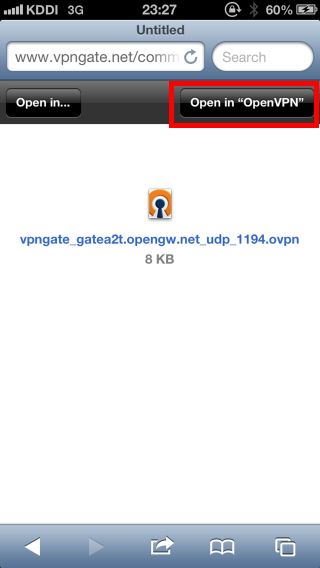
When you attempt to open .ovpn file on iOS, OpenVPN Connect will start automatically. A question whether you want to install the .ovpn file will be displayed.
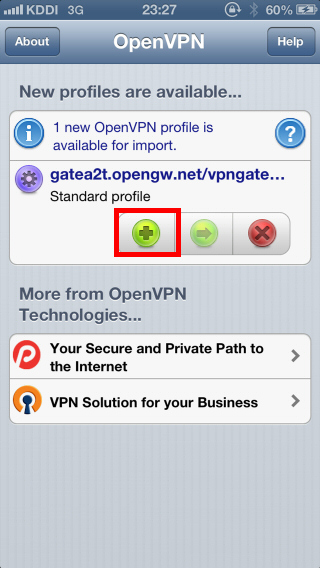
Tap the "+" button to install the .ovpn file.


3. Connect a VPN

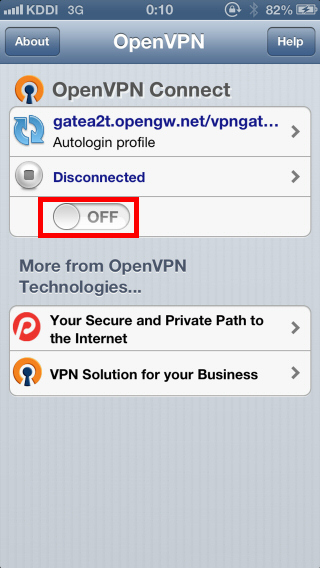
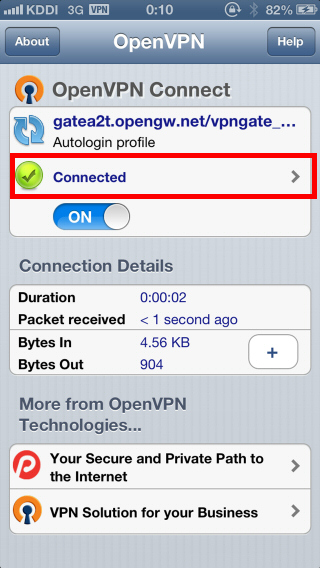
To connect a VPN connection, start OpenVPN Connect, select an imported .ovpn file, and tap the "OFF" button.
After the VPN is established, the "Connected" status will be displayed as follow.


4. Enjoy Internet via VPN relaying

While VPN is established, all communications towards the Internet will be relayed via the VPN Server.
You can visit the VPN Gate Top Page to see your current global IP address. You can see your source country or region has been changed to other if you are connecting to a VPN server which is located on oversea country.
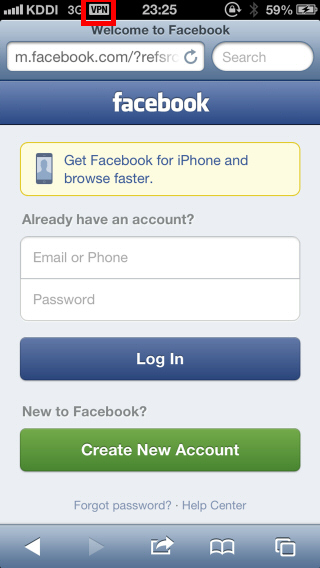
iOS displays the "VPN" indicator on the top bar of the screen while VPN is established.


Enjoy YouTube, Facebook or Twitter while your VPN connection is established.
Facebook, Twitter and Gmail uses HTTPS (SSL) encrypted communication protocols. Regardless of VPN or non-VPN, no one can tap these encrypted communications.

VPNGATE TUTORIAL FOR ANDROID 4.0 OR LATER

VPNGATE TUTORIAL FOR ANDROID 4.0 OR LATER

To view image to maximize.

1. Install OpenVPN Connect (only once for the first time)

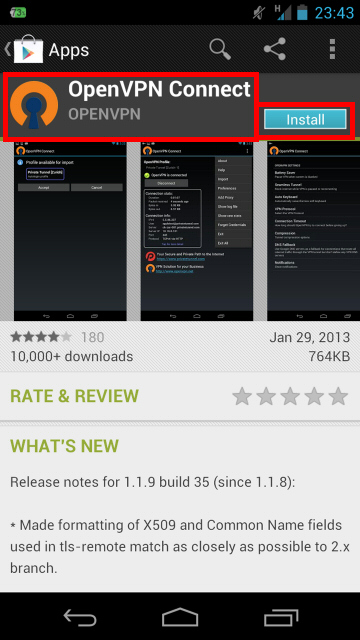
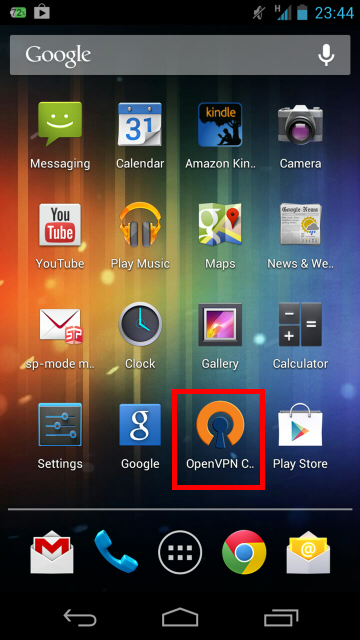
Start "Google Play Store" , search "OpenVPN Connect" application and download it. 


2. Download and install a connection setting file (.ovpn file) of OpenVPN (only once at the first time)

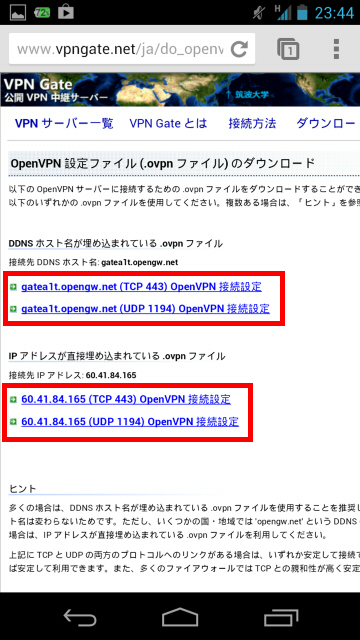
You have to download an OpenVPN connection setting file (.ovpn) in order to connect to a VPN Gate Public VPN Relay Server by using OpenVPN.


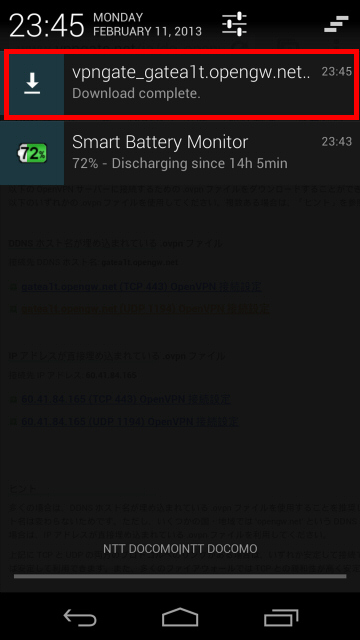
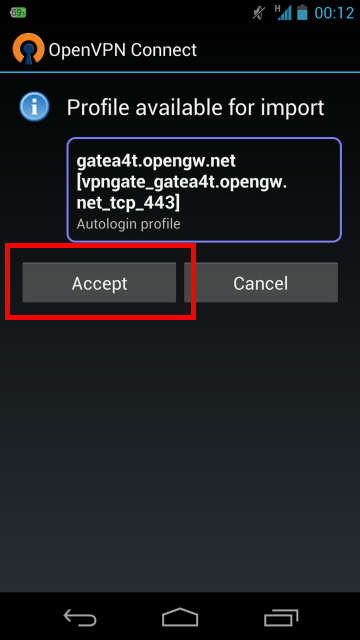
After you install OpenVPN Connect, you can open the Public VPN Relay Servers List page, click a .ovpn file and import it into OpenVPN Connect directly.

You can also open the Public VPN Relay Servers List page in your PC, download a .ovpn file, attach it on an e-mail and send it to Android.


3. Connect a VPN

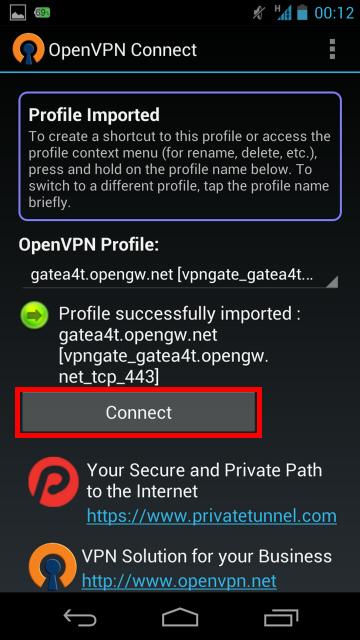
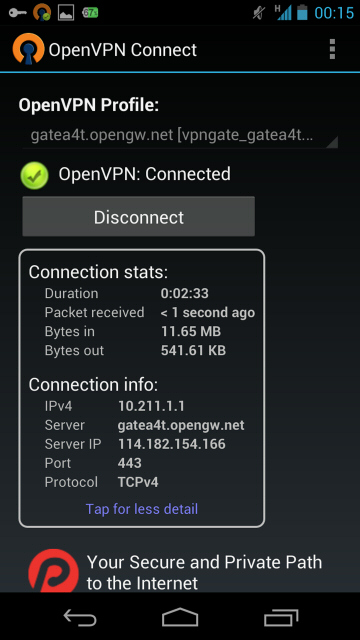
To connect a VPN connection, start OpenVPN Connect, select an imported .ovpn file, and tap the "Connect" button.
After the VPN is established, the "Connected" status will be displayed as follow.


4. Enjoy Internet via VPN relaying

While VPN is established, all communications towards the Internet will be relayed via the VPN Server.
You can visit the VPN Gate Top Page to see your current global IP address. You can see your source country or region has been changed to other if you are connecting to a VPN server which is located on oversea country.


Lovely apps at Apple Games/Apps

Wednesday, April 17, 2013

Get 1-year of Hotspot Shield free plus a chance to win $50,000 in scholarships.


Good new to all student who are using Hotspot shield. Hotspot shield pronounce that they will give 1-year of Hotspot Shield free plus a chance to win $50,000 in scholarships.
Hotspot Shield protects your entire web surfing session, securing your connection at both your home Internet network & Public Internet networks (both wired and wireless). Hotspot Shield free proxy protects your identity by ensuring that all web transactions (shopping, filling out forms, downloads) are secured through HTTPS. Hotspot Shield also makes you private online, making your identity invisible to third party websites and ISP‘s. Unless you choose to sign into a certain site, you will surf anonymously during your entire web session with Hotspot Shield. We love the web because of the freedom that it creates to explore, organize, and communicate. Hotspot Shield VPN Client enables access to all information online, providing freedom to access all web content freely and securely. Secure your entire web session and ensure your privacy online; your passwords, credit card numbers, and all of your data is secured with Hotspot Shield. The standard antivirus software protects your computer, but not your web activities. That‘s why AnchorFree is pleased to offer Hotspot Shield. Our application keeps your Internet connection secure, private, and anonymous.

You can get it here. Hotspot Shield

Tuesday, June 19, 2012

FREE VPN - proXPN to your iPhone

What is proXPN?
proXPN is a global VPN (virtual private network) that creates a secure, encrypted tunnel through which all of your online data passes back and forth. Any application that requires an internet connection works with proXPN - including your web browser, email client, and instant messaging program - keeping everything you do online hidden from prying eyes while masking your physical location and giving you unfettered access to any website or web service no matter where you happen to live or travel to.

INSTRUCTION:

1. Download proXPN here.
2. After you download. To begin, open your Settings screen and choose "General."

3. Choose Network.

4. Choose VPN

5. Choose "Add VPN Configuration"


6. Select "PPTP" at the top of the screen, then add a description, the proXPN server location you would like to use (see list below), and your username and password. Make sure RSA SecurID is toggled "off" and your encryption level is set to "Auto." Note: we highly recommend sending all traffic through proXPN.
Once done, hit "Save" in the top right-hand corner.

proXPN PPTP Locations:
Miami: pptp.proxpn.com
New York: pptp-ny1a.proxpn.com
Seattle: pptp-se1.proxpn.com
Los Angeles: pptp-la1.proxpn.com
London: pptp-uk1.proxpn.com
Amsterdam: pptp-nl1.proxpn.com
Singapore: pptp-sg1a.proxpn.com


7. Your device will now attempt to connect to proXPN

8. The connection is being negotiated.
9. Your account username and password is being authenticate.
10. The connection to proXPN is now established and live.
11. Ensure that "VPN" is toggled "on" back on your Settings screen.
That's it! Your iOS device is now connected via proXPN!

Enjoy your FREE VPN in your iPhone using proXPN. ;)

Lovely apps at Apple Games/Apps

Sunday, June 17, 2012

FREE VPN - Hotspot Shield for ANDROID

You can now use Hotspot Shield from your ANDROID phone! Yup, that's right.


Description
FREE VPN 2012 for your Android Device Unlimited Bandwidth
Currently supports Android 2.0-2.3.7 OS devices only


Hotspot Shield for Android provides the same great features as our popular desktop software which has been downloaded 60 million times:
PROVIDES INTERNET SECURITY & PRIVACY: protect yourself in Wi-Fi hotspots (VPN encrypts all traffic); protect your identity and your IP address to stop unwanted tracking.
GIVES YOU ACCESS to your favorite sites: Unblock any blocked content and services--get Facebook, Skype, YouTube, Flickr and other sites wherever you are. 
BLOCKS & NOTIFIES you of spam, phishing and rogue websites. (ELITE subscription* only)
SAVES YOU $$$: Hotspot Shield Bandwidth Compression speeds up browsing and shows you how much you saved on your data plan. Hotspot Shield has already saved 37 million MB of bandwidth for its mobile users. (ELITE subscription only)

OFFER MARKETPLACE: Gives you opportunity to download apps, complete easy offers and surveys to get Hotspot Shield ELITE for Android or desktop and hundreds of other items like gift cards and Facebook credits absolutely free!

*Monthly and Annual ELITE Subscriptions Available. All subscriptions provide Unlimited VPN Bandwidth and No Ads. 
NOTE: Before starting Hotspot Shield VPN - if you have other installed VPN clients, please be sure that they are disconnected.
NOTE: If you see the "Uninstall" button on the application main screen and if you plan to uninstall the app - please tap on this button to uninstall the application. If there is no "Uninstall" button on the screen - please use your usual way to uninstall application.
Copyright : AnchorFree, Inc.

Support URL: http://hotspotshield.uservoice.com/
Contact email: support@anchorfree.com or android@hotspotshield.com


Download your Hotspot Shield 2012 here.

-credits to 89dufpoqidjv, drwang12 

FREE VPN - SecurityKISS Tunnel (3servers) +Portable OpenVPN 2.2.1 Globe&Smart WORKING

SecurityKISS Tunnel is the program and the service that allow you access Internet despite censorship and local restrictions. It also makes your connection secure and prevents others from viewing your web browsing activities, instant messages, downloads, credit card information or anything else you send over the network.
Technically SecurityKISS Tunnel is a Virtual Private Network (VPN) implementation. It creates a VPN between your laptop and our security gateway so that all your Internet traffic goes through impenetrable, non-transparent tunnel.

SecurityKISS Tunnel redirects all your online traffic through an impenetrable tunnel to our security gateway.

Everything in the tunnel is encrypted so you can:

Ensure your passwords, credit card numbers, online shopping and all of your data is secured
Protect yourself from snoopers at Wireless hotspots, hotels, airports, corporate offices
Protect your data from being intercepted by various network sniffers
Protect yourself from identity theft online
SecurityKISS is not recommended for heavy downloader. It has a bandwith limit of 300mb/Day. But this VPN is perfect for browsing and online games.


Important:
Please note: Every downloaded instance of SecurityKISS Tunnel is a different binary. Please do not share copies of downloaded binaries nor make them available on sharing websites. The shared binary is not going to work. Moreover it is in your interest not to share downloaded program because it will stop working for you. If you want to recommend it to someone – share the news and redirect people to our download website where they can get software for free.

INSTRUCTION:

1. Using GLOBE sim w/ 0 balance, (for udp)APN: http.globe.com.ph (for tcp)www.globe.com.ph, (for udp)Access number: *99# (for tcp)*99***1#, Authentication Protocol Settings: PAP
*Using SMART sim w/ at least 2php balance(not smart bro sim), APN: internet, Access Number: *99#, Authentication Protocol Settings: PAP or CHAP

2. Download the SecurityKISS then install.
3. After you install the SecurityKISS go to C:\Program Files\SecurityKISS Tunnel\OpenVPN\config. Copy all the files from this folder and paste it on  data/config of OPENVPN Portable 2.2.2 then you can now uninstall the SecurityKISS.


This are the file that you need

4. You can now download the SecurityKISS.rar, paste all the files that came from data/config of OPENVPN to this folder after you download it. 


This should looked like after you've done step 4.
5. Try to connect and then browse.


-credits to 89dufpoqidjv, drwang12 

New Configuration of Hotspot Shield


Hotspot Shield works on both SMART and GLOBE user in Philippines.


INSTRUCTION:
This are the simple steps to work with Hotspot Shield 2012.


1. Using GLOBE sim w/ 0 balance, (for udp)APN: http.globe.com.ph (for tcp)www.globe.com.ph, (for udp)Access number: *99# (for tcp)*99***1#, Authentication Protocol Settings: PAP
*Using SMART sim w/ at least 2php balance(not smart bro sim), APN: internet, Access Number: *99#, Authentication Protocol Settings: PAP or CHAP


2. Download TAP-HSS 2.25 Adapter for x86 and x64.rar extract it, execute "addtap_hss_adapter", wait untill it install successfully.


3. Download now the Hotspot Shield 2012
For GLOBE
For SMART


4. For those who are having trouble with Hotspot Shield 2012 that are connected but they can't browse. just DISCONNECT and RE-CONNECT your Hotspot Shield 2012 until the pinger will turn blue.


-credits to 89dufpoqidjv, drwang12